
Jul 29
A few errors and suggestions <3
ERRORS:
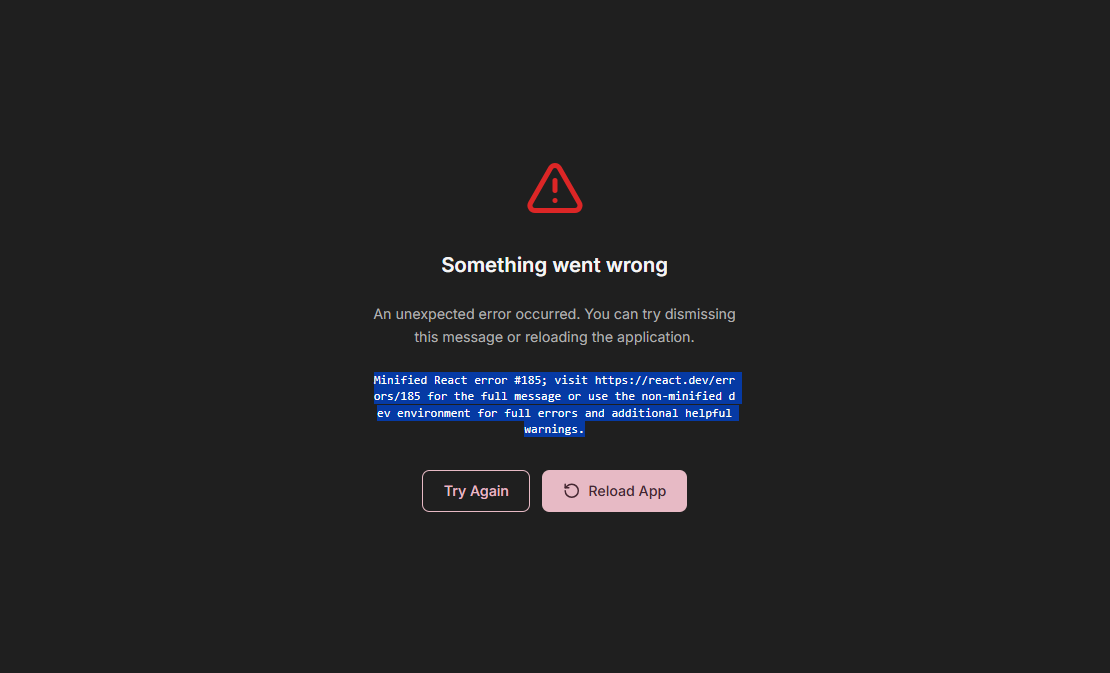
- There is an error every time I use the zoom in feature on the bottom right of the screen (see image attached). I know there are other ways to zoom in, but it's more conveniently placed.
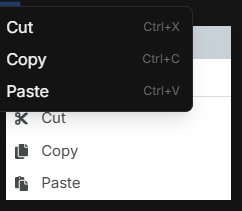
- Two copy and paste trays appear and overlap when using the right click short cut (see image attached).
- Back button and session managing buttons overlapping when on the website browser (see image attached).
- Images are cut off for the opening document/website tray (see image attached)
- Incorrect spelling grammar suggestions (see image attached)
SUGGESTIONS:
Aside from that, I was wondering if you could:
+ Add a way to hide the session tabs (or any tabs) on the screen while working, as it can be a bit distracting since it hangs over top of the page a bit once you open multiple tabs (see image attached).
+ Create a way to copy and paste things from the internet into my document for citations with a right click shortcut as well, right now I can only use keyboard commands.
+ A wordsearch tool for websites so it's easier to do research.
+ Lastly, I often like to customize my margin sizes when writing, so it would be helpful to have ruler tool to measure the page and set my own margins.
__________
These are all the things I could find over the couple weeks with this software, but amazing work all around!
---
*Imported from Canny · originally posted by Sapphire Johnson · on 2026-07-15 · 2 votes on Canny*
*UserJot allows 4 attachments per request; the remaining 3 Canny images are linked here:*
- https://canny-assets.io/images/e0c05809aa514c7cbac6719b3ca47…
- https://canny-assets.io/images/e059bf59902fd18a5cf23bed729d6…
- https://canny-assets.io/images/3a5f5d74edcdd0fd3699ebfe868fc…


Completed